
OnlyFans Auto-Renew Explained Before Your Next Charge
Auto-renew on OnlyFans is the setting that quietly decides when your next payment leaves your bank account. It is not hidden, and it is not random. It is simply a recurring subscription that continues until you stop it, and every charge follows the same predictable cycle. Once you understand that cycle, you can plan around it instead of being surprised by it. This guide explains how the renewal works, when the next charge lands, and how to switch it off without losing the access you already paid for.

Most confusion comes from mixing up two separate things: the subscription itself and the renewal setting attached to it. The subscription is your access to a page. The renewal setting is the instruction that tells the platform to charge you again when the current period ends. You can keep one without the other for a short time, which is exactly why the timing matters so much.
What auto-renew actually does
Auto-renew controls three things at once, and all three matter when you are deciding whether to keep a subscription running. It sets the date of your next charge, it defines how long your access lasts after that charge, and it locks in the price you agreed to at the moment of renewal. If any of those three changes, the renewal behaves differently than you might expect.
In plain terms, the platform holds an instruction that says: on this date, charge this amount, and extend access for another period. Nothing else happens unless you or the creator changes something. That is the whole mechanism, and it is why a renewal never appears out of nowhere.
- Charge date: the day the next payment is attempted, based on when you originally subscribed.
- Access window: the period your payment covers, usually one month from the charge date.
- Price: the amount tied to your current subscription, which the creator can adjust later.
Because these three elements are linked, cancelling auto-renew stops the future charge but does not undo the access window you already paid for. That distinction is the single most useful thing to remember.

When the next charge lands
Your renewal date is almost always the same day of the month as your original subscription date. If you subscribed on the 12th, the next charge lands on the 12th of the following month, and so on. The exact time of day is less important than the date, because cancellations are processed against the date, not the hour.
To find it, open the page you subscribed to and look at the subscription status shown on the profile. It displays the renewal date directly, and it is the fastest way to confirm what you are actually signed up for. Once you have that date, count back a few days to create a safety margin.
A safe cancellation point is at least 48 hours before the renewal date. That buffer covers time zones, processing delays, and the occasional slow confirmation screen. If you cancel on the same day the charge is due, you are relying on timing you cannot control.
- Standard paid subscriptions typically cost between $4.99 and $15 per month.
- Many pages sit in the $5 to $10 range, which is the most common bracket.
- The maximum listed subscription price is $49.99 per month.
- There is no base price below $4.99; only a promotional first month may dip under that figure.

Turning it off step by step
Cancelling auto-renew is done from your own account settings, not from the creator’s page. The path is consistent: open your settings, find the subscriptions or renewals section, select the active subscription, and choose the option to turn off auto-renew. The confirmation screen then shows the date your access will end.
That confirmation date is the important part. It tells you exactly how long you keep access after the renewal is switched off, and it should match the end of the period you already paid for. If the date looks wrong, stop and check again before closing the window.
Practical tip: take a screenshot of the confirmation screen showing the access end date. If a charge appears after that date, the screenshot is the fastest way to resolve it with support.
- Cancelling the subscription entirely instead of just the renewal, which can cut access early.
- Assuming the cancellation worked without reading the confirmation date.
- Waiting until the charge day itself to act.
- Confusing a page unfollow with a subscription cancellation; they are separate actions.
- Forgetting that a second subscription on another page still renews independently.

Access after you switch it off
Switching off auto-renew does not remove your access immediately. In most cases, access runs until the end of the current paid period, which is the date shown on the confirmation screen. You keep everything you already paid for, and the platform simply stops charging you when that period expires.
What changes at the end date is your ability to view subscriber-only posts and send subscriber-level messages. What remains is your account itself, your message history, and any content you purchased separately through pay-per-view. Those purchases are not tied to the subscription renewal.
| Element | Ends at period end | Remains after period end |
|---|---|---|
| Subscriber-only posts | Yes | No |
| Account and login | No | Yes |
| Purchased pay-per-view content | No | Yes |
| Future automatic charges | Yes | No |
This is why cancelling early is usually better than cancelling late. You lose nothing by turning the renewal off a week before the date, because the access window stays intact. You only lose the ability to be charged again. For a starting point, best onlyfans management collects free pages.

Price changes and renewals
Creators can adjust their subscription price at any time, and that change affects renewals rather than existing paid periods. When a creator raises the price, auto-renew stops on its own. Your existing access continues until the current paid period ends, but no new charge is made at the higher amount unless you actively resubscribe.
That behaviour protects subscribers from silent price increases, and it is worth knowing because it changes what you see on the page. A subscription that suddenly shows as expired may simply be a renewal that was cancelled by a price change rather than by you.
- A renewal date that disappears from the subscription status area.
- A page showing a different price than the one you originally paid.
- A notice that your subscription will not renew automatically.
- An access end date that arrives without a matching charge.
For anyone comparing paid pages, the usual bracket runs from $4.99 up to about $15, with averages between $5 and $10. Anyone tracking renewal costs across several pages may find third-party tools or a service such as best onlyfans management useful for keeping the numbers straight.

Free pages and auto-renew
A free page is one where the subscription price is set to $0. That does not always mean there is no renewal setting attached. Free follows can still carry a renewal flag in your subscription list, and it is worth checking rather than assuming.
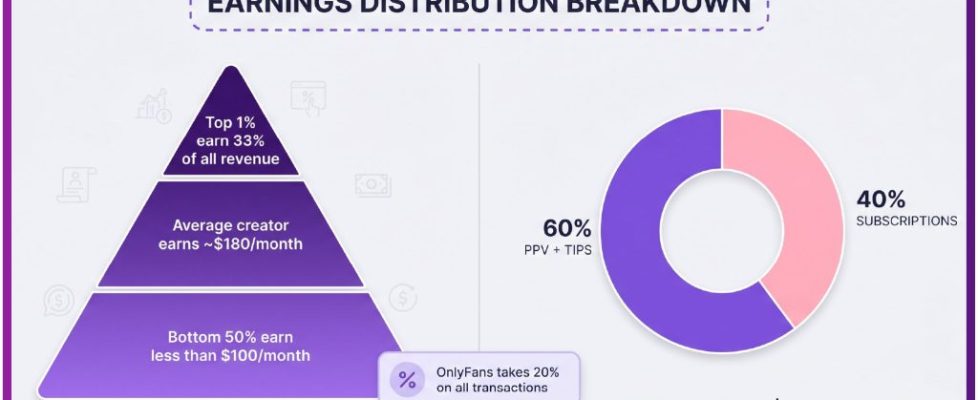
Free pages earn through pay-per-view messages and tips instead of subscriptions. The platform fee is 20% on everything, including subscriptions, tips, and pay-per-view, so the creator keeps 80% of whatever is spent. Renewal settings on free pages exist mainly for account tracking, not for charging.
Checking is simple: open your subscriptions list and look at each entry. A free follow with a renewal flag will show a renewal date, even though the amount is zero. Removing the flag takes the same steps as cancelling a paid renewal.
Timing your cancellation
A calendar method removes the guesswork. Note the renewal date for each subscription, then subtract three days to get your latest safe cancellation day. If the renewal falls on a weekend or a public holiday, subtract five days instead.
| Renewal date | Latest safe cancellation day |
|---|---|
| 5th of the month | 2nd of the month |
| 12th of the month | 9th of the month |
| 20th of the month | 17th of the month |
| 28th of the month | 25th of the month |
Setting a phone reminder on the safe cancellation day is more reliable than trying to remember the renewal date itself. The reminder only needs to prompt a decision, not an action, so you can keep the subscription if you still want it.
Keeping a renewal list
If you follow more than two or three pages, a simple written list is more effective than memory. Write down each subscription as you add it, and update the list whenever a price change or cancellation happens. The list takes a minute to build and saves a lot of unnecessary charges.
- Page name and the date you subscribed.
- Monthly price at the time of subscription.
- Next renewal date.
- Safe cancellation day, three days before the renewal.
- Whether auto-renew is currently on or off.
Because OnlyFans has no built-in discovery feed or directory, most people find pages through outside lists and ranking sites. That same lack of a central dashboard is why a personal renewal list works better than relying on the platform to remind you.
BestOnlyFans readers often ask whether cancelling affects a creator’s payout. It does not affect what they already earned; it only stops the next charge. BestOnlyFans also notes that the 20% platform fee applies to every transaction regardless of renewal status.
Once the list is in place, the whole process becomes routine. You check dates, decide, and act a few days ahead. BestOnlyFans-style tracking is simply the habit of writing it down before the charge arrives.
FAQ
Does cancelling auto-renew remove my access right away?
No. Access normally continues until the end of the paid period, and the confirmation screen shows that exact end date.
Why did my renewal stop without me cancelling it?
This usually happens when the creator raised the subscription price, which ends auto-renew while existing access runs to the period end.
Can a free page still charge me?
A free page has a price of $0, so it does not charge for the subscription itself, but pay-per-view messages and tips are paid separately.
When is the safest time to cancel?
At least three days before the renewal date, or five days if that date falls on a weekend or public holiday.